ESP32 LVGL 2.1" 480×480 Touch Display IP67+ RS485 CAN USB 3-in-1 Adapter Board
ESP32-S3 2.1" 480×480 touch display with LVGL support and RS485, CAN, USB interfaces. Ideal for industrial HMI, smart control panels, IoT terminals, vehicle dashboards and embedded systems.
Your reliable partner for semiconductor solutions. Flychip supports customers from R&D to mass production with electronic component supply, BOM sourcing, PCB, SMT and PCBA services.
- 20+
- Years Component Supply
- BOM
- Multi-Part Sourcing
- PCBA
- PCB / SMT Support
- Part No.:
- ESP32 LVGL 2.1" 480×480 Touch Display IP67+ RS485 CAN USB 3-in-1 Adapter Board
- Manufacturer:
- CHINA
- Category:
- Embedded MCU, DSP Evaluation Boards
- Package:
- Datasheet:
-
-
- Description:
- ESP32-S3 2.1" 480×480 touch display with LVGL support and RS485, CAN, USB interfaces. Ideal for industrial HMI, smart control panels, IoT terminals, vehicle dashboards and embedded systems.
- Quantity:


-
Quality Control
Supplier review, channel management and product verification before delivery.
-
Global Channels
International chip manufacturer and well-known distributor sourcing network.
-
BOM to Production
Component supply support from R&D prototype to mass production.
-
PCB / SMT / PCBA
Integrated manufacturing support to accelerate product development and delivery.
Product Details
ESP32 LVGL 2.1" 480×480 Touch Display IP67+ RS485 CAN USB 3-in-1 Adapter Board
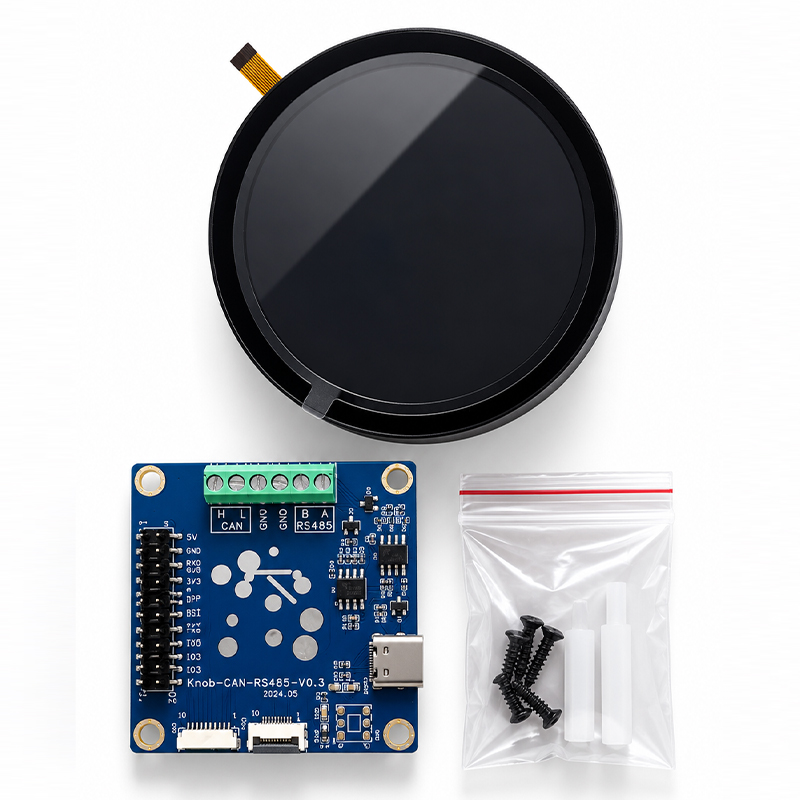
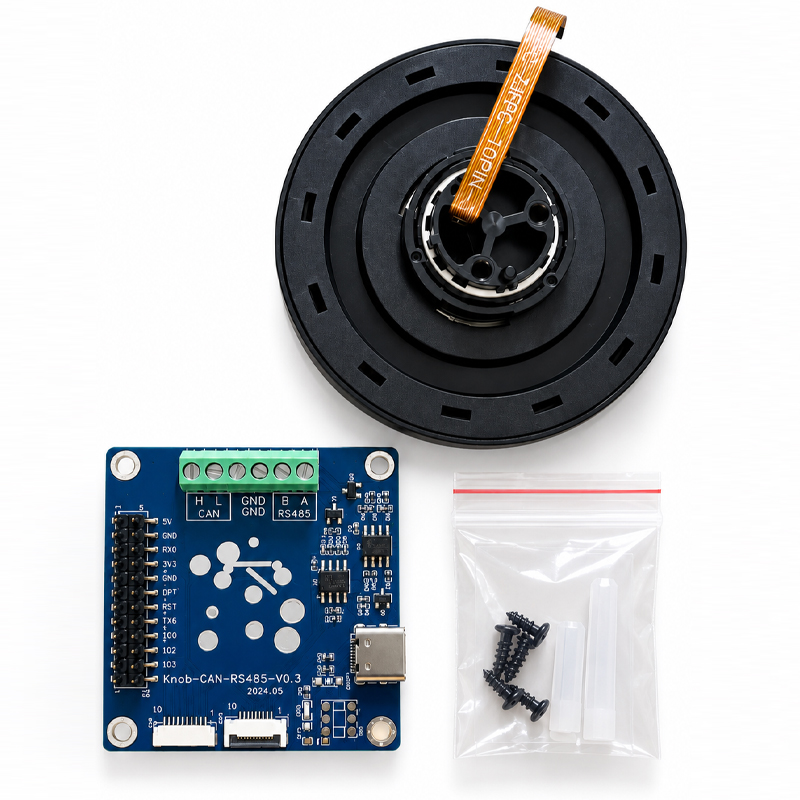
The ESP32 LVGL 2.1" 480×480 Touch Display IP67+ RS485 CAN USB 3-in-1 Adapter Board is a compact embedded HMI solution that combines a round high-resolution touch interface with ESP32-S3 processing and practical wired communication options. It is designed for developers who need a modern GUI, industrial communication and flexible embedded control in one compact platform.
What Is the ESP32 LVGL 2.1 Inch Touch Display System?
Quick answer: it is a compact ESP32-S3 HMI platform built around a 2.1-inch 480 × 480 capacitive touch display and paired with a 3-in-1 communication adapter for RS485, CAN and USB. It is suitable for industrial controllers, smart equipment, IoT terminals, vehicle interfaces and custom LVGL control panels.
Many embedded products need more than a screen. A useful HMI must process data, display information clearly, accept user input and communicate with the equipment around it. In older designs, these functions are often divided between several boards: one display board, one main controller, one CAN interface, one RS485 converter and another USB board for programming or service.
The ESP32 LVGL 2.1" 480×480 Touch Display IP67+ RS485 CAN USB 3-in-1 Adapter Board takes a more integrated approach. The ESP32-S3 provides the computing platform. The circular touch LCD becomes the user interface. LVGL provides a flexible graphical framework. The companion communication board then brings commonly required wired interfaces together in a compact hardware layer.
This architecture is useful because embedded HMI development is not only a display problem. A control panel may need to read a CAN message from a machine, display a warning icon, allow the operator to change a setting, send a new command through RS485 and still provide USB access for configuration or firmware development.
Combining these functions can reduce wiring, simplify enclosure design and make the system easier to maintain. For developers building compact control panels, dashboards or smart equipment interfaces, this system is more useful as a complete interaction platform than as a simple LCD module.
System Architecture: Display, ESP32-S3 and Industrial Interfaces
A useful way to understand this product is to divide it into three functional layers. The front layer handles human interaction. The middle layer runs the application. The communication layer connects the HMI to other electronic systems.
This three-layer structure is important because each part has a clear job. The display does not need to understand the machine protocol. The communication board does not need to draw graphics. The application running on the ESP32-S3 connects the two sides and decides what the operator sees and what commands are sent.
The result is a modular system that can be adapted to very different products without completely redesigning the hardware.
ESP32 2.1 Inch Touch Display Key Specifications
The table below summarizes the main technical characteristics of the ESP32-S3 2.1-inch 480 × 480 display platform and the communication features of the bundled adapter board.
| Parameter | Specification | Engineering Value |
|---|---|---|
| Main Controller | ESP32-S3 | Suitable for embedded GUI, IoT and HMI processing |
| CPU Architecture | 32-bit Xtensa LX7 dual-core | Provides enough processing capability for GUI and communication tasks |
| CPU Frequency | Up to 240 MHz | Useful for responsive LVGL applications |
| Display Size | 2.1 Inch | Compact size for knobs, control panels and embedded dashboards |
| Display Resolution | 480 × 480 Pixels | High resolution for a small circular HMI |
| Display Panel | IPS LCD | Provides practical viewing angles and strong UI readability |
| Display Controller | ST7701 Series | Common RGB display architecture for embedded LCD applications |
| Touch Type | Capacitive Touch | Provides a cleaner user experience than mechanical-only controls |
| Touch Interface | I2C | Simplifies touch communication with the ESP32-S3 |
| Touch Controller | CST820 | Supports single-point capacitive touch operation |
| PSRAM | 8 MB | Important for frame buffers, images and richer LVGL interfaces |
| Flash Memory | 16 MB | Provides space for firmware, fonts, icons and GUI resources |
| Wireless | 2.4 GHz Wi-Fi + Bluetooth LE | Supports IoT connectivity and wireless configuration |
| GUI Framework | LVGL Compatible | Enables modern embedded graphical interfaces |
| Industrial Interface | RS485 | Useful for long-distance industrial serial communication |
| Vehicle / Machine Bus | CAN | Suitable for controllers, automation and CAN-based equipment |
| USB Interface | USB / USB Type-C | Useful for development, service, power or configured USB functions |
| Additional Resources | RTC, IMU, TF Card, UART, I2C | Expands the range of standalone HMI applications |
Hardware Capability Dashboard
The following visual gives a practical view of where this platform is strongest. It is not a benchmark score. Instead, it shows how the hardware fits common embedded HMI requirements.
Why a 2.1 Inch 480×480 Display Works Well for Compact HMI Design
A 2.1-inch screen sounds small when compared with a tablet or industrial monitor, but screen size should be evaluated together with the application. Many embedded devices do not need a large rectangular display. They need a small interface that shows the right information at the right time.
The 480 × 480 resolution is particularly useful because it gives the interface enough pixels for sharp icons, circular gauges, status rings, numbers and compact menus. On a round screen, the square pixel matrix also gives GUI designers enough freedom to create radial layouts that would be difficult on lower-resolution displays.
A common design mistake is to copy a smartphone-style layout onto a small embedded panel. That usually creates tiny text and crowded buttons. A better approach is to design around the shape of the display. Large central values, circular progress indicators, edge status icons and short menus work much better.
This is where the round 2.1-inch format becomes an advantage rather than a limitation. It naturally fits rotary controls, smart appliance panels, climate controllers, marine instruments, charging equipment, audio controllers and vehicle dashboards.
The IPS display also supports practical viewing from different angles. This matters when the HMI is mounted into a machine rather than held directly in front of the user's eyes.
ESP32-S3 and LVGL: A Strong Combination for Embedded GUI Development
LVGL is one of the reasons this display platform is attractive to embedded developers. Instead of drawing every button, label or animation manually, developers can build the interface from reusable graphical objects.
A typical LVGL screen may contain labels, arcs, sliders, charts, switches, images and animated indicators. The application can then update those objects when new CAN, RS485, sensor or wireless data arrives.
The ESP32-S3 is well suited to this type of work because it combines processing capability with useful memory resources. The reference 2.1-inch platform provides 8 MB of PSRAM and 16 MB of Flash, which is valuable because graphical applications often need more memory than simple sensor nodes.
Fonts, icons and background images consume Flash. Display buffers consume RAM or PSRAM. Animations and charts also require processing time. Having a larger memory configuration gives designers more room to create a polished interface without reducing every asset to the smallest possible size.
The best LVGL applications still require careful optimization. Large full-screen animations can use considerable memory bandwidth. Updating only the parts of the screen that change is usually more efficient than rebuilding an entire page continuously.
Developers should also separate GUI tasks from communication tasks. CAN or RS485 data should normally be processed independently and then passed to the interface layer. This keeps the screen responsive even when the device is receiving frequent bus traffic.
Why the RS485 + CAN + USB 3-in-1 Adapter Board Matters
The adapter board is one of the most useful parts of this product combination because it changes the display from a standalone development screen into a more practical communication terminal.
RS485
Useful for industrial controllers, Modbus devices, meters, sensors and equipment that requires robust differential serial communication.
CAN Bus
Suitable for vehicle electronics, industrial automation, motors, battery systems and distributed controllers using CAN communication.
USB
Provides a convenient physical connection for development, power, service access or USB functions supported by the configured hardware and firmware.
The deeper advantage is not simply having three connector types. It is the ability to build one HMI platform that can be reused across several product families.
One customer may need RS485. Another machine may use CAN. A laboratory version may mainly need USB. If the same display and application framework can support these different interfaces, the developer can keep more of the firmware and mechanical design common between products.
Using RS485 for Industrial HMI and Modbus Applications
RS485 remains common in industrial equipment because it is simple, differential and suitable for communication over longer cable distances than basic logic-level UART.
For an ESP32 HMI, RS485 can be used to communicate with PLC-related devices, energy meters, motor controllers, temperature controllers, sensors and other embedded nodes. Modbus RTU is one common protocol used over RS485, although RS485 itself is only the electrical communication layer.
A useful HMI design can read registers from a connected device and convert raw data into information that is easier for an operator to understand. Instead of displaying register 40112 as a number, the screen could show a temperature gauge, warning color or operating mode.
The same interface can send commands in the opposite direction. A touch button can become a start command, a slider can change a target speed, or a menu can set operating parameters.
Engineers should still pay attention to bus termination, grounding, cable quality, baud rate and network topology. A good-looking screen cannot compensate for a poorly designed RS485 network.
CAN Bus Applications: Vehicles, Machines and Distributed Controllers
CAN provides another important path for the ESP32 LVGL display. It is widely used where multiple electronic controllers need reliable message-based communication.
In a vehicle or machine, the display can operate as a visual node on the network. It can receive speed, temperature, battery, pressure or operating-state data and convert those messages into a graphical dashboard.
This is especially useful for small electric vehicles, robots, battery systems, custom machinery and laboratory equipment. A developer can create a dedicated interface without installing a large industrial computer.
CAN-based products also benefit from the circular screen format. Speed, RPM, current, voltage, state of charge and temperature can all be represented with radial gauges that naturally match a round display.
The design should still define message identifiers, update rates, error handling and timeout behavior carefully. If a CAN message stops arriving, the HMI should not continue showing an old value as though it were current. A professional interface should clearly indicate stale or lost communication.
Understanding the IP67+ Design Positioning
The IP67+ element in this product configuration is important for equipment intended for exposed control-panel environments. However, ingress protection needs to be understood correctly.
A bare circuit board is not automatically waterproof simply because the front display is designed for sealed installation. The final protection level depends on the complete mechanical system: front glass, housing, gasket, mounting pressure, cable openings, connectors and enclosure design.
This distinction matters for industrial equipment. A display installed correctly into a sealed front panel can be suitable for much harsher conditions than the same electronics operated as an open development board on a workbench.
For commercial products, the final assembled equipment should be validated using the relevant ingress-protection test method rather than relying only on the appearance of the front panel.
RS485 vs CAN vs USB: Which Interface Should You Use?
| Interface | Best Use | Main Advantage | Typical Example |
|---|---|---|---|
| RS485 | Industrial serial communication | Long cable capability and differential signaling | Modbus meter or industrial sensor |
| CAN | Multi-node machine networks | Reliable message-based communication | Vehicle dashboard or motor controller |
| USB | Programming, service or configured USB functions | Convenient connection to computers and development tools | Firmware loading or local configuration |
| Wi-Fi | Network and IoT applications | Wireless access to LAN or cloud services | Smart home control panel |
| Bluetooth LE | Local wireless setup | Low-power connection to phones or nearby devices | Configuration or commissioning |
Best Applications for the ESP32 LVGL 2.1 Inch HMI
The strongest use cases are products that need a compact graphical interface plus real communication with other hardware.
Industrial Control Panels
Display machine status, alarms, temperatures, operating modes and process values while communicating through RS485 or CAN.
Vehicle Dashboards
Build compact CAN-based displays for EVs, robots, utility vehicles, motorcycles and custom automotive systems.
Smart Home Controllers
Use Wi-Fi, touch control and LVGL graphics for lighting, climate, scenes, energy information and local automation.
Battery Management Displays
Show state of charge, cell information, temperature, current and alarms from CAN or serial-connected battery systems.
Motor and Motion Controllers
Create compact interfaces for speed, direction, operating state, current limits and machine parameters.
IoT Terminals
Combine local touchscreen operation with Wi-Fi connectivity for remote monitoring and connected smart equipment.
The Real Advantage Is Not the Screen - It Is System Consolidation
It is easy to describe this product as a 2.1-inch ESP32 screen, but that description misses its most important engineering value.
The real advantage is system consolidation. A conventional embedded panel may require a separate display, MCU board, communication converter and programming interface. Each additional board introduces connectors, cables, mounting points and possible failure locations.
When more functions are brought into one architecture, the number of electrical and mechanical interfaces can be reduced. This can make the final product smaller and easier to assemble.
It also makes firmware reuse easier. A company developing several machines can build one LVGL interface framework and then change the communication layer or screen layout for each product.
This is often more valuable than saving a small amount on one component. Engineering time, enclosure complexity, cable assembly, field service and software maintenance all contribute to the real cost of an embedded HMI.
Power, PCB and Wiring Considerations
A graphical display system consumes more power than a simple sensor node. The LCD backlight, ESP32-S3, wireless radio and communication interfaces all contribute to the total current requirement.
Designers should therefore size the power supply for peak load rather than using only the average current measured on an idle screen. Wi-Fi transmission, display activity and connected peripherals can create short current peaks.
Ground design also matters. RS485 and CAN are designed for robust communication, but poor grounding or noisy power can still create unstable systems. Keep high-current switching circuits away from sensitive communication paths where possible.
Cable connectors should also be selected for the final environment. A prototype jumper cable is useful on a bench but may not be suitable for a machine that experiences vibration.
Hardware Checklist
- Confirm stable power under peak load.
- Check CAN and RS485 termination requirements.
- Keep communication wiring away from noisy power paths.
- Use reliable connectors for vibration environments.
- Verify enclosure sealing around cables and mounting points.
- Test the final screen brightness in real lighting.
Software Checklist
- Separate LVGL rendering from bus communication tasks.
- Use timeouts for CAN and RS485 data.
- Show communication errors clearly.
- Avoid unnecessary full-screen refreshes.
- Store important settings safely.
- Plan firmware recovery and service access.
How to Design a Better LVGL Interface for a Round 480×480 Screen
A high-resolution screen does not automatically create a good HMI. Interface design becomes even more important when the physical display is small.
The first rule is hierarchy. The operator should immediately understand the most important value or action. A motor controller may show speed in the center. A battery display may place state of charge in the center. A thermostat may display temperature.
Secondary information can then be placed around the edge. Warning icons, wireless status, communication state and small labels are good candidates for the outer ring.
Touch targets should also be large enough for real fingers. Tiny desktop-style buttons may look elegant in a screenshot but become frustrating on physical hardware.
Animation should communicate information rather than simply decorate the page. A smooth gauge movement is useful. A constantly moving background may only waste processing power.
For industrial products, clear status colors and readable text are usually more important than complicated visual effects. A professional interface often feels simple because unnecessary information has been removed.
Recommended Development Workflow
Build the Hardware Interface
Confirm display operation, touch response, power supply and the required CAN, RS485 or USB connection.
Create the LVGL Structure
Build screens around real user tasks instead of creating every possible page before communication works.
Add Communication
Decode CAN frames, Modbus values or custom serial data and map them to meaningful application variables.
Connect Data to the GUI
Update labels, arcs, indicators and warnings from controlled application data rather than directly from raw bus messages.
Test Failure Conditions
Disconnect cables, stop CAN messages and interrupt power to confirm the user interface handles errors safely.
Validate the Final Enclosure
Test viewing angle, touch response, temperature behavior, sealing, connector access and real installation conditions.
When Should You Choose This 2.1 Inch ESP32 HMI?
This product is a strong choice when space is limited but the user still needs a graphical interface. It is particularly suitable when the same device must communicate with both modern and traditional embedded systems.
It can be more practical than a larger Linux-based display when the application only needs local control, telemetry and simple networking. ESP32-based systems typically start faster, require less storage and can be easier to integrate into compact hardware.
On the other hand, a larger display may be better if the interface needs long text, complex tables, video, web browsing or many controls visible at the same time.
The decision should therefore be based on information density rather than display size alone.
ESP32 LVGL HMI vs a Basic LCD Module
A basic LCD module is mainly a display component. It normally depends on another controller to provide the application logic and communication.
This ESP32-based solution is different because the processing platform is already part of the system. The HMI can read data, make decisions, manage communication and update the screen locally.
That difference can reduce the number of boards inside a product. It also allows the display to perform useful work even when no external PC is connected.
For example, a simple LCD might show a value sent by a host MCU. The ESP32 HMI can instead communicate directly with a CAN controller, calculate a trend, trigger an alarm, store configuration and display the result.
This makes it closer to a small embedded control computer than a passive screen.
What to Check Before Buying or Integrating the Product
Product pages for embedded displays often focus heavily on the resolution and processor name, but engineers should check several additional details before starting a production design.
First, confirm the exact display version. Similar-looking 2.1-inch modules may use different touch panels, connectors or firmware examples.
Second, confirm what is included with the 3-in-1 adapter board. CAN, RS485 and USB functions should match the intended firmware and cable design.
Third, check the mechanical version carefully. A flat touch panel and a curved front panel may require different enclosure dimensions.
Finally, distinguish development capability from final-product certification. A development board can help create an IP-rated product, but the final assembled enclosure determines whether the complete device meets the required environmental standard.
Engineering Perspective: Why This Combination Stands Out
The most interesting part of the ESP32 LVGL 2.1" 480×480 Touch Display IP67+ RS485 CAN USB 3-in-1 Adapter Board is not one individual specification. It is the way the specifications work together.
A 480 × 480 display provides enough detail for a polished UI. ESP32-S3 provides local processing and wireless connectivity. LVGL gives developers a mature interface framework. RS485 and CAN connect the panel to real industrial and embedded equipment. USB makes development and service easier.
This combination closes the gap between a hobby development screen and a practical embedded HMI platform.
It is especially useful for teams that want one hardware architecture that can be reused across multiple products. The visual design can change. The communication protocol can change. The enclosure can change. But much of the core hardware and software platform can remain the same.
That reuse can reduce engineering time and make future product updates easier to manage.
Frequently Asked Questions
What is the ESP32 LVGL 2.1 inch 480×480 touch display?
It is a compact ESP32-S3-based embedded HMI platform with a 2.1-inch 480 × 480 touch display. It is designed for graphical control, IoT applications, dashboards and embedded user interfaces.
Does the 2.1 inch ESP32 display support LVGL?
Yes. The ESP32-S3 platform, external PSRAM and high-resolution display make it suitable for LVGL-based graphical interfaces such as gauges, buttons, menus, charts and status panels.
What is the screen resolution?
The display resolution is 480 × 480 pixels. This provides useful detail for icons, text, gauges and compact circular dashboards.
Is the screen capacitive touch?
Yes. The reference 2.1-inch platform uses capacitive touch with an I2C touch interface and supports single-point touch operation.
What processor does the display use?
The platform uses an ESP32-S3 processor with a dual-core 32-bit Xtensa LX7 architecture and operating frequency up to 240 MHz.
How much memory is available?
The reference configuration includes 16 MB Flash and 8 MB PSRAM, providing useful space for firmware, fonts, graphics and LVGL display buffers.
What is the purpose of the RS485 interface?
RS485 is useful for industrial serial communication. It can connect the HMI to meters, controllers, sensors and other equipment, including systems using protocols such as Modbus RTU.
What can the CAN interface be used for?
CAN is commonly used in vehicles, industrial equipment, motor control, robots and battery systems. The display can receive CAN data and present it through an LVGL dashboard.
Does the product support USB?
Yes. USB connectivity is part of the platform and adapter architecture. The exact USB role can depend on the hardware version and firmware configuration, including development, power or supported USB communication functions.
Does the ESP32 display support Wi-Fi?
Yes. ESP32-S3 supports 2.4 GHz Wi-Fi, allowing the HMI to communicate with local networks, web services, IoT systems or wireless configuration tools.
Does it support Bluetooth?
Yes. Bluetooth Low Energy support can be used for local setup, mobile-device interaction and short-range wireless communication.
Is this display suitable for industrial control?
It can be well suited to compact industrial HMI projects because the platform combines local processing, touch control and interfaces such as RS485 and CAN. Final industrial suitability still depends on power, enclosure, EMC and environmental design.
Can I use it as a vehicle dashboard?
Yes. The round format and CAN connectivity make the platform useful for custom vehicle dashboards, EV displays, robotic systems and machine instrumentation when the complete electrical design is appropriate for the application.
Is the bare development board waterproof?
A bare PCB should not be treated as waterproof. IP protection depends on the complete installed assembly, including the front panel, housing, gasket, connectors and cable entry points.
Why is 8 MB PSRAM useful for LVGL?
Graphical applications require memory for display buffers, images and other assets. Extra PSRAM gives developers more room for richer LVGL interfaces than systems with very limited memory.
Is this better than a normal LCD module?
It serves a different purpose. A normal LCD mainly displays data, while an ESP32-based HMI can process data, run application logic, communicate with other devices and manage the graphical interface locally.
ESP32 LVGL 2.1 Inch Touch Display Summary
The ESP32 LVGL 2.1" 480×480 Touch Display IP67+ RS485 CAN USB 3-in-1 Adapter Board combines a compact high-resolution touch interface with ESP32-S3 processing, LVGL GUI support and practical communication options.
Its 2.1-inch 480 × 480 format is particularly well suited to circular gauges, control knobs, machine indicators, smart-home interfaces and compact embedded dashboards. The ESP32-S3 platform adds Wi-Fi, Bluetooth, local processing and enough memory for more advanced graphical applications.
The RS485, CAN and USB adapter layer gives the platform an additional advantage for real equipment integration. Instead of remaining only a graphical development board, the display can become part of an industrial controller, vehicle network, battery system, smart appliance or IoT terminal.
For developers, the strongest benefit is flexibility. One core HMI platform can support many different products through changes in firmware, interface configuration and mechanical design.
For production teams, the key areas to verify are the exact display version, adapter-board revision, cable pinout, enclosure design, communication termination, power supply and environmental sealing.
When these areas are handled correctly, this ESP32-S3 LVGL touch-display system offers a strong balance of compact size, visual quality, industrial connectivity and software flexibility for modern embedded HMI development.
From Component Sourcing to Production Delivery
Flychip has been providing electronic components to global customers for 20 years. We combine component supply, BOM services, PCB, SMT and PCBA support to help customers accelerate product development and delivery.
-
R&D Support
Fast sourcing support for prototype development, sample validation and early-stage engineering needs.
-
BOM Services
Multi-line BOM matching with component supply, alternative suggestions and procurement follow-up.
-
Mass Production
Stable supply coordination for production preparation, batch delivery and long-term purchasing needs.
-
Experienced Team
Over 15 years of channel management, quality control, sales management and organization management experience.
ESP32 LVGL 2.1" 480×480 Touch Display IP67+ RS485 CAN USB 3-in-1 Adapter Board Technical Information
- Specifications
- FAQ
- Hot Sale
- Related Products
Specifications
- Product Attributes
- Attribute Value
- Manufacturer:
- CHINA
- Series:
- ESP32-S3
- Packaging:
- Bulk
- Product Status:
- Active
- Type:
- HMI Touch Display Development Board
- Core Processor:
- ESP32-S3R8 Dual-Core Xtensa LX7
- Platform:
- ESP32 / LVGL
- Utilized IC / Part:
- ESP32-S3R8, ST7701, CST820
- Mounting Type:
- Panel Mount / Board Mount
- Contents:
- 2.1" Touch Display, RS485/CAN/USB Adapter Board, Cable, Mounting Accessories
FAQ
1. How to order ESP32 LVGL 2.1" 480×480 Touch Display IP67+ RS485 CAN USB 3-in-1 Adapter Board on Flychip?
You can submit an RFQ directly on this page. Our sales team will review your quantity, delivery requirements and target price, then reply with a quotation as soon as possible.
2. How does Flychip verify the quality of ESP32 LVGL 2.1" 480×480 Touch Display IP67+ RS485 CAN USB 3-in-1 Adapter Board?
We work with qualified channels including international chip manufacturers and well-known distributors. Our team pays close attention to supplier review, traceability, product condition and quality control.
3. Are the price and inventory of ESP32 LVGL 2.1" 480×480 Touch Display IP67+ RS485 CAN USB 3-in-1 Adapter Board updated in real time?
Inventory and prices of electronic components may fluctuate frequently. The displayed data is for reference, and the final quotation will be confirmed by our sales team.
4. What payment methods are accepted?
Wire Transfer, PayPal, Alipay, WeChat, Credit Card, Western Union, MoneyGram and Escrow may be supported depending on the order and region.
5. How is shipping arranged?
We can arrange international shipping through DHL, UPS, FedEx, TNT and other logistics channels. Tracking information will be provided after shipment.
6. What is the return or replacement process for ESP32 LVGL 2.1" 480×480 Touch Display IP67+ RS485 CAN USB 3-in-1 Adapter Board?
Please contact our sales team within the specified period if there are quantity differences, wrong items, or clear external defects. The product should remain unused and in its original packaging.
7. Can I request technical support for ESP32 LVGL 2.1" 480×480 Touch Display IP67+ RS485 CAN USB 3-in-1 Adapter Board?
Yes. You can contact us for datasheet, package details, pin information and sourcing assistance related to ESP32 LVGL 2.1" 480×480 Touch Display IP67+ RS485 CAN USB 3-in-1 Adapter Board.
Hot Sale
Related Products
-
-
SC0915
Raspberry Pi
-
-
102010428
Seeed Technology Co., Ltd
-
-
SC0917
Raspberry Pi
-
-
SC1631
Raspberry Pi
-
-
102010328
Seeed Technology Co., Ltd
-
-
102010388
Seeed Technology Co., Ltd
-
-
4600
Adafruit Industries LLC
-
-
102010268
Seeed Technology Co., Ltd
-
-
C124
M5Stack Technology Co., Ltd.
-
-
3500
Adafruit Industries LLC
-
-
5302
Adafruit Industries LLC
-
-
DFR0282
DFRobot
ESP32 LVGL 2.1" 480×480 Touch Display IP67+ RS485 CAN USB 3-in-1 Adapter Board Sourcing & Technical Support
ESP32 LVGL 2.1" 480×480 Touch Display IP67+ RS485 CAN USB 3-in-1 Adapter Board is supplied by CHINA. This page provides key purchasing information including manufacturer, package, datasheet, stock reference, price reference and RFQ support.
As your reliable partner for semiconductor solutions, Flychip supports customers from research and development to mass production with electronic component supply, BOM sourcing, PCB, SMT and PCBA solutions.
Our sourcing partners include international chip manufacturers and well-known distributors. With rich experience in channel management, quality control and sales management, Flychip helps customers accelerate product development and delivery.
- Part Number
- ESP32 LVGL 2.1" 480×480 Touch Display IP67+ RS485 CAN USB 3-in-1 Adapter Board
- Manufacturer
- CHINA
- Package
- Category
- Embedded MCU, DSP Evaluation Boards
Quick RFQ Send your inquiry and our sales team will respond quickly.
Tips
Please check your information and try again.